Website relaunch without ranking loss, checked against real traffic
Key points
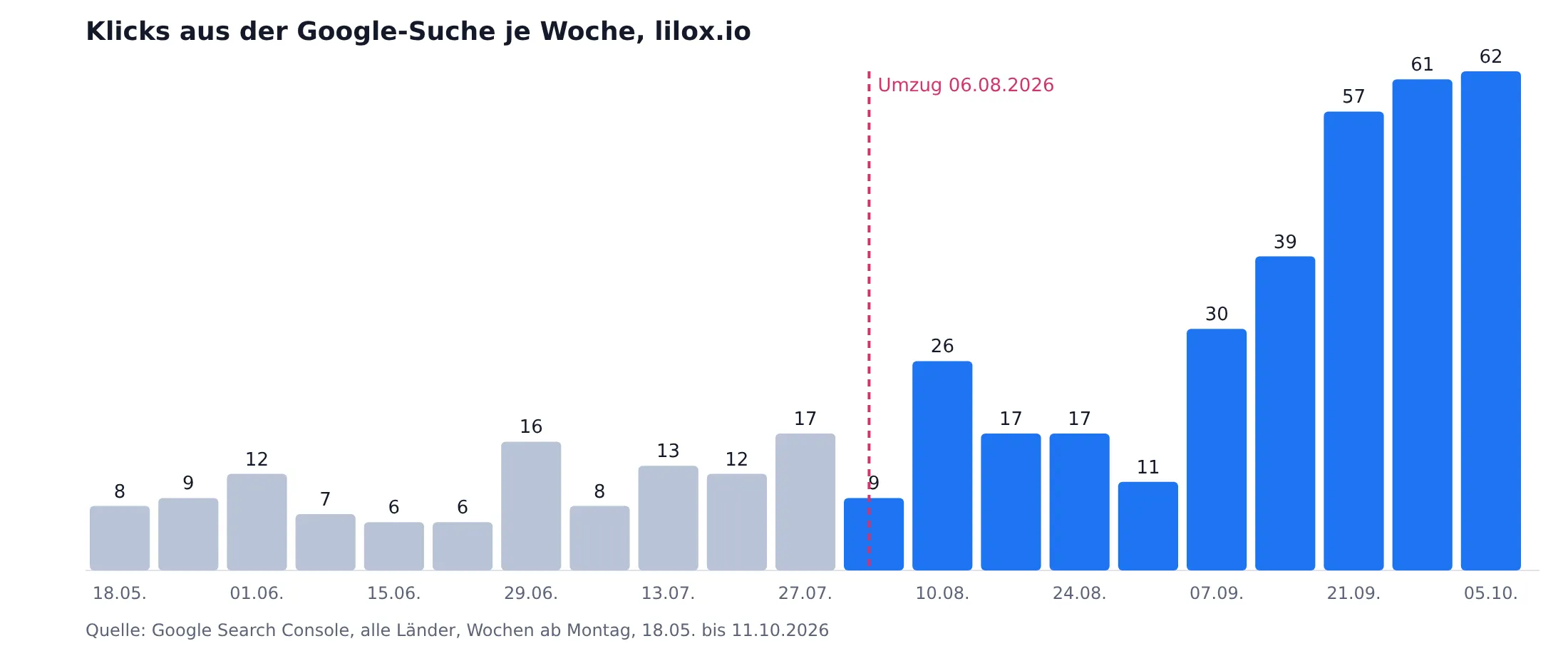
Before moving lilox.io, we ran every old address that had appeared in 16 months of Search Console or 14 months of Google Analytics against our new redirect rules. The chart shows what happened afterwards. There was no drop: in the first full week after the move, clicks were already above the level from before.
- Rankings are tied to addresses. Anyone who moves has to know every address that still receives visits.
- The check list comes from real traffic. Our sitemap knew 132 addresses, Search Console 201 and Analytics 591 paths.
- Before go-live, 217 addresses with traffic landed on an existing new page, none on a missing one.
- Search Console showed us one error only five days after the move. Chapter 4 explains which one.
Chapter 1. Why rankings are tied to addresses
Google collects signals for an address, not for a piece of content. Inbound links, internal linking and visitor behaviour are tied to the URL. If it disappears, the signals disappear with it. A permanent redirect with 301 or 308 tells Google where the successor lives, and according to Google it costs no link equity. A temporary redirect with 302 or 307 does not transfer this signal.
This gives rise to the real task of a relaunch. Every address with traffic needs a suitable destination before go-live. You will find the complete project plan in our Website relaunch checklist.
Chapter 2. The check against real traffic
A redirect plan is only as good as the list it is checked against. That is why we took the addresses that actually receive visits and used the sitemap only as a supplement.
- Pull two lists. From Search Console, every address with at least one click or one impression over 16 months. From Google Analytics, all paths viewed over 14 months.
- Clean up. Remove protocol and host, keep parameters separate, decode special characters for the comparison. Then sort out what does not belong to the website. For us, that was 125 paths of the appointment booking service, which used the same Analytics property.
- Run through. Every address runs against the redirect rules, as the server evaluates them. The topmost matching rule wins.
- Check the target. For every rule that is hit, check whether the target page exists in the built version of the new website.
On 5 August this gave four lists. 217 addresses landed on an existing page, none on a missing one. 74 needed no rule, because they still exist unchanged. 93 were not covered by any rule, and we looked at these 93 individually.
Chapter 3. What gets no redirect
Around 75 of the 93 addresses had exactly one hit in Analytics and no signal in Search Console. They were remnants of the old page-builder kit, login paths, double slashes and test visits. In addition, there were 198 addresses that were never real pages, because a menu link without a leading slash had attached every path to every other path.
There is no redirect for any of these addresses. A rule without a suitable target sends visitors to a page they did not look for, and many redirects to the home page are treated by Google as soft 404s.
“A redirect without a suitable target is a claim we cannot back up. Then a clean 404 is better.”
Chapter 4. The error that only Search Console showed us
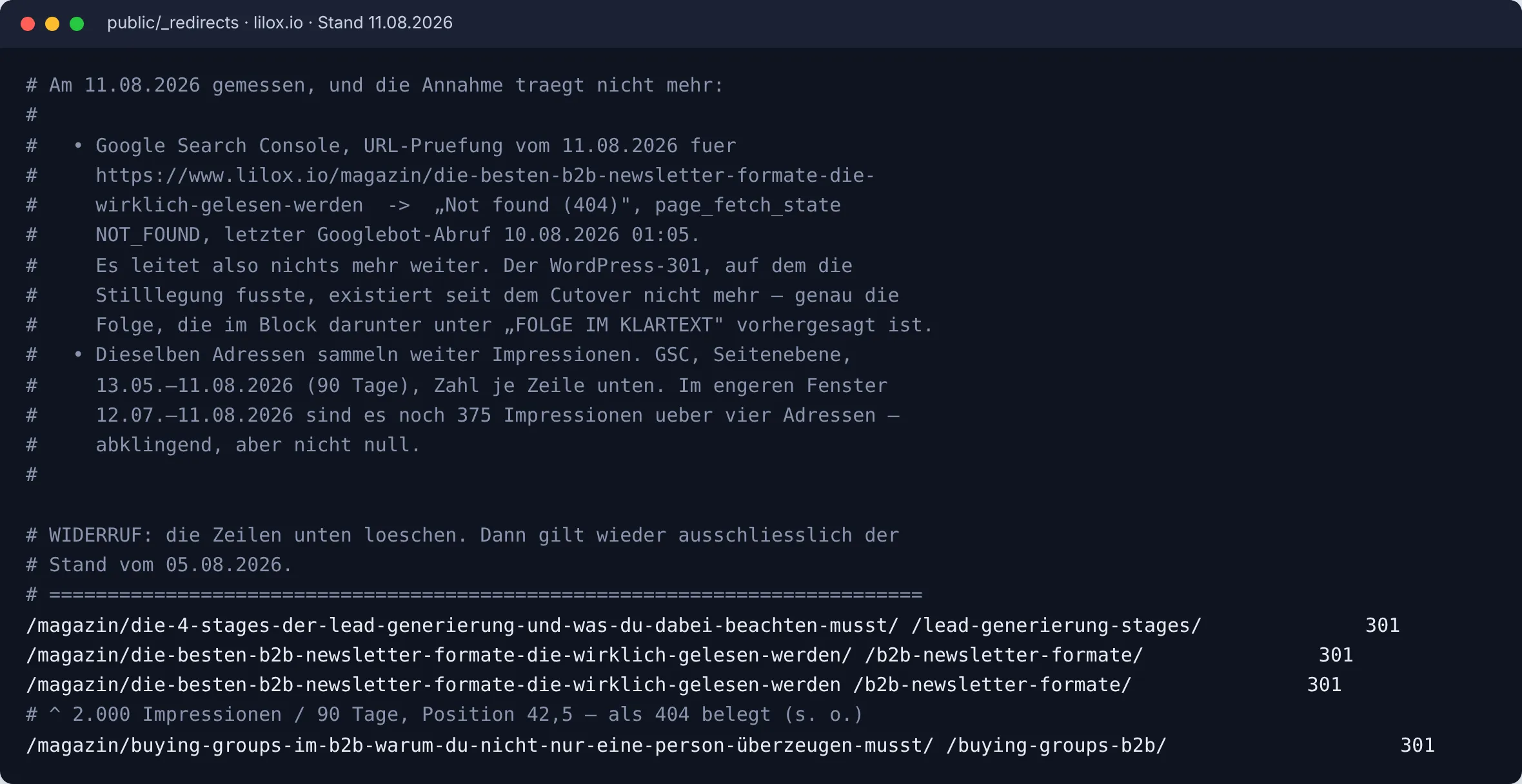
On the day before go-live we had set aside 144 redirects for old magazine addresses. The assumption was that the old WordPress site would redirect these addresses itself anyway. With the move, however, that old redirect had disappeared.
Five days later, the URL Inspection in Search Console showed “Not found (404)” for one of these addresses. This address alone had collected 2,000 impressions in the 90 days before. We then switched back on all set-aside mappings that met two conditions. They had impressions in the 90 days, and they were marked as safe because the new title matched the old one. Three derived mappings stayed off, including one address with 912 impressions, because there a content decision is still needed on which article answers the question.
The lesson from this has been part of every one of our relaunch plans since then. We check any assumption about the old system after go-live with the URL Inspection, before we rely on it.
Chapter 5. Six rules for every redirect
- Server-side and permanent. 301 or 308, not a redirect via JavaScript.
- Straight to the final destination. Googlebot follows up to ten redirects in a row, but Google recommends avoiding chains.
- One to one. An old address leads to the page that continues its content, not to a category.
- All variants. With and without www, with and without a trailing slash, umlauts also in the percent-encoded form.
- Take files along. Images and PDFs with backlinks need the same redirect as pages.
- Keep for at least a year. Google recommends keeping redirects for as long as possible, generally at least one year.
Chapter 6. The first two weeks after go-live
In the first two weeks we read Search Console daily. If error pages rise, a redirect is missing. If the indexed addresses of the old sitemap fall and those of the new one rise, the move is working. In addition, we check individual old addresses with the URL Inspection, which is how we found the error from Chapter 4.
After that, we compare weekly against the baseline. For lilox.io, the 30 days up to 11 October brought 224 clicks from Google Search, compared with 78 in the 30 days before. Part of this is due to new content. The trend has nevertheless shown that the move did not cost any rankings.
Frequently asked questions
Do 301 redirects lose link equity?
According to Google, they do not. A permanent redirect transfers the signals of the old address to the new one. Fluctuations in the first few weeks are nevertheless normal.
Should I change the URL structure during a relaunch?
Only for a good reason. Every changed address needs a redirect and a check. If you can keep the structure, you save most of the work from Chapter 2.
Does a relaunch also affect visibility in ChatGPT, Copilot and similar?
Yes. AI crawlers follow redirects, but only if the robots.txt lets them in. During our move, a Cloudflare default setting blocked nine AI crawlers. Therefore, check the delivered robots.txt after go-live.
Revised in October 2026: rewritten with our redirect check and the figures from Search Console, considerably shortened, author added.
Sources
- Google Search Central, “Site moves with URL changes”: https://developers.google.com/search/docs/crawling-indexing/site-move-with-url-changes
- Google Search Central, “Redirects and Google Search”: https://developers.google.com/search/docs/crawling-indexing/301-redirects
- Own data: redirect check of 5 August 2026, redirect file of 11 August 2026, Google Search Console lilox.io.